One inbox for every way clients reach your veterinary clinic
PupPilot's omnichannel inbox puts every call, voicemail, text, email and fax your clinic receives in one list. Each conversation is tied to the client and their pets, shows what PupPilot AI already did, and stays open until someone on your team closes it.
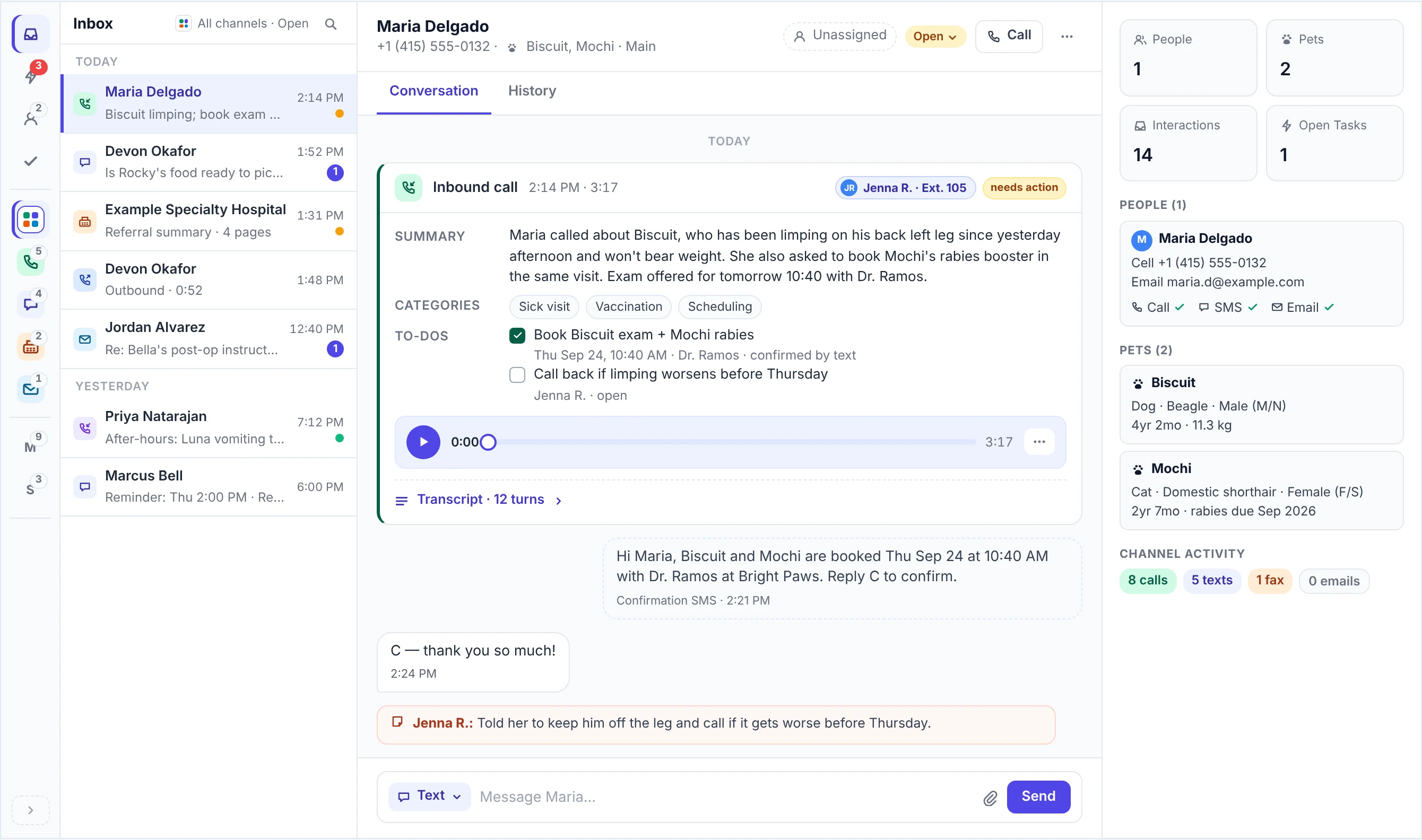
The omnichannel inbox: every channel in one list
Phone calls and voicemails arrive with the recording, the transcript and a summary. Texts, emails and faxes land in the same list.
- Calls and voicemails, with the recording, transcript and summary
- Texts
- Emails
- Faxes
- Website chats Coming soon
What needs a person, first
The action-required queue puts urgent calls at the top and the rest below them, with in-progress and completed work still in view. Filter it by department, by category or by what PupPilot AI flagged.
Reply where the client wrote
Answer a text with a text and an email with an email, from the same screen.
- Internal notes for whoever picks it up next
- "All" and "Mine" views
- Each conversation open, in progress or closed
The client and patient alongside
Household, pets, history and contact preferences sit next to the conversation, so the client and the patient are beside every item, with no second screen.
Medical IntelligenceThe right team
Calls and conversations are assigned to departments by your clinic's rules for call routing, with a default department for everything else, and any of them can be moved to another department in one click.
Nothing lost between channels
A caller who hangs up gets a text. A caller who asks for the address, a booking link or a form gets it by text during the call. A voicemail becomes a task, and a fax arrives in the same place as everything else. Replies to reminders come back to the inbox too.
Veterinary reminder softwareWhat happened while you were away
The Home snapshot shows overnight, today and this week: follow-ups outstanding, transfers, questions answered and emergencies triaged.
On the go
Take and make calls and texts from the mobile app, on your clinic's number.
What it replaces
Separate places
- A shared mailbox for client email.
- A separate texting app.
- A fax tray.
- Notes passed across the desk.
One inbox
- Client emails in the same list as calls, texts and faxes, answered from the same screen.
- Texts answered with a text from the same screen, on your clinic's number.
- Faxes arrive in the same place as everything else.
- Internal notes on the conversation, for whoever picks it up next.
Questions clinics ask
Can several people work the inbox at the same time?
Yes. It's one shared inbox for your whole team, with "All" and "Mine" views. Each conversation is open, in progress or closed, so everyone can see what's already been picked up, and internal notes tell whoever takes it next what's been done.
Do calls and texts from the same client appear together?
Yes. Texts and calls from the same client are in one inbox, tied to the client and their pets. The client's full history across phone, text and email sits beside the conversation.
Can we see what the AI said before we reply?
Yes. Each conversation shows what PupPilot AI already did. Calls and voicemails carry the recording, the transcript and a summary, so whoever replies starts from what was said.
Does the inbox include fax?
Yes. Fax is sent and received in the same place as everything else, so faxes land in the same list as calls, voicemails, texts and emails.
Can pet parents message us from our website?
Yes, on a website PupPilot builds, where PupPilot AI answers the chat. Chats handed to your team in the inbox are Coming soon.
Is there a mobile app?
Yes, for calls and texts on your clinic's number. Your team can take and make calls, and send and answer texts, from the PupPilot mobile app.